Adjust Layer
Use this dialog to adjust layers.
Where to Find the Dialog
Right-click in the Group Editing dialog and select Adjust Layer...
Adjust Height
You can choose between two methods: vertical and parallel.
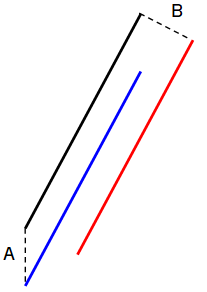
A = Vertical, B = Parallel
Adjust to Layer
You can adjust a layer up to or down to another layer. This is especially useful when surveying models. For example, a layer may end up above another, even though this is not possible in practice (such as rock above soil).
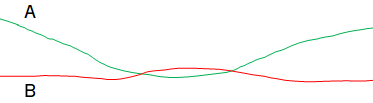
A = Soil, B = Rock
The figure below shows the result if you choose to adjust rock down to soil.
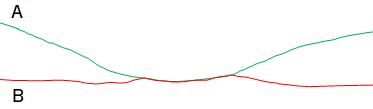
A = Soil, B = Rock