3d-visualisering
Advanced Surface Rendering (LightWorks)
Gemini Terrain+ contains simple functions for visualizing data, as described in the following section:
With TerraPlan, you can present the wireframe model as a rendered model with advanced surface rendering and maximum shadow calculation.
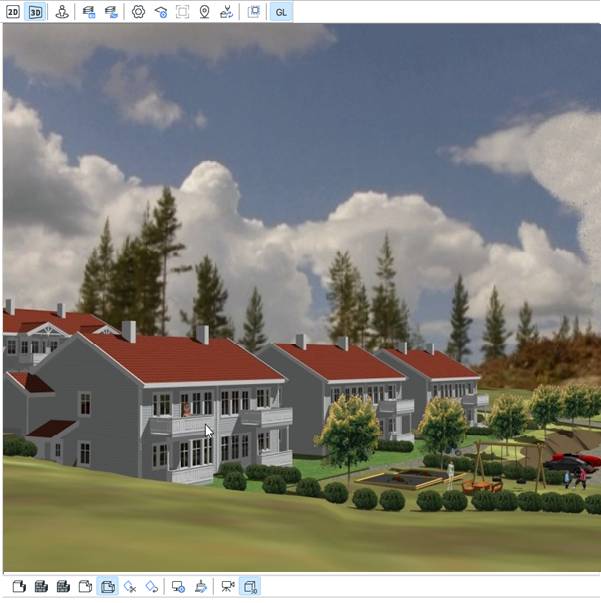
Figure: Advanced surface rendering with maximum shadow calculation
Info
Advanced surface rendering (LightWorks) is a more advanced method with no limitations related to textures or different ways of handling them. The same light sources used in real-time surface rendering are also available here. If advanced surface rendering is not licensed, a watermark is displayed in front of the model.
Animations
You can create several types of animations that produce AVI files with advanced surface rendering. To print images and create animations with advanced surface rendering, you must have an extended license.
You can play the files in Microsoft Media Player.
Tips and Advice
The following tips about settings can be useful when you test the animation features.
Resolution
- 160x100 for testing (fast, suitable for checking speed, colors, with shadows, and without shadows)
- 320x200 for demonstration (takes a little more time, but works well when you want to show ideas to several people around the screen)
- 480x300 for presentations (run rendering at night, as this can be demanding for less powerful machines)
- 720x576 for TV quality with low or no compression (very demanding)
Tip
Use the machine's processing power at night. Avoid heavy rendering jobs during the day. Test with 160x100 during the day, and run heavier renderings at night.
Number of Frames
- 25 frames per second is the standard for TV and video.
- 12 frames per second is common for demonstrations and testing.
Example Collection
See the example collection for how to complete the workflow: