Courses and Support
Standard Courses
We hold standard courses in Gemini Terrain throughout the year. You can find an overview of the courses on Invera's course page.
Customized Courses
All courses can be arranged and tailored to your needs, either in our training facilities or at your location using your own data.
A course can be combined with general consulting on installation and configuration.
Maintenance Agreement
The maintenance agreement covers phone support as specified in the agreement, and free updates to new versions. Normally, one new major version is released each year, in addition to service and interim releases.
Support Contact Information
- Phone: +47 924 50 000
- Customer portal: https://support.invera-tech.com/
- Email: support@invera-tech.com
Shortcut to support
In Gemini Terrain, you can find a shortcut to the customer portal under Help - Contact support.
Screen Sharing During Phone Support
During phone support, screen sharing between you and the support consultant is often needed. For this, we use TeamViewer QuickSupport, which you download and start before the session is connected.
You can download TeamViewer QuickSupport from our support and download website.
When connecting, give the support consultant the ID and password for the session. Both are shown in the TeamViewer QuickSupport window.
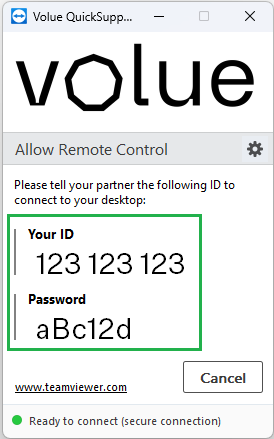
We recommend using the phonetic alphabet when you read out the password. This reduces the risk of misunderstandings due to noise or poor audio quality.
| Letter | Word |
|---|---|
| A | Alfa |
| B | Bravo |
| C | Charlie |
| D | Delta |
| E | Echo |
| F | Foxtrot |
| G | Golf |
| H | Hotel |
| I | India |
| J | Juliett |
| K | Kilo |
| L | Lima |
| M | Mike |
| N | November |
| O | Oscar |
| P | Papa |
| Q | Quebec |
| R | Romeo |
| S | Sierra |
| T | Tango |
| U | Uniform |
| V | Victor |
| W | Whiskey |
| X | X-ray |
| Y | Yankee |
| Z | Zulu |
Operational Status for Gemini Connected
Status messages for Gemini Connected are published at https://statusconnected.geminisuite.com/. You can also find the link in the Help menu.
Subscribe to status messages
You can subscribe to status messages via email or Microsoft Teams. You will then automatically receive a notification when maintenance is planned, or when services are not operating normally for other reasons. Go to the status page, click Get Updates at the top right, and choose whether to receive messages by email or in Microsoft Teams.